How to Use Dyson Vacuums: A Complete Guide for Easy, Effective Cleaning
Wondering how to use Dyson vacuum cleaners properly? Start by charging the vacuum fully before first use. A full charge usually takes 3.5 to 5 hours and ensures longer run time.
Next, assemble your vacuum by snapping the magnetic nozzles onto the wand. They rotate 360 degrees for ease. Using attachments right boosts cleaning power on different surfaces.
Use the crevice tool for tight spots. The mattress tool works best on beds.
Choose the right cleaning mode for your floor type. Adjust your cleaning style to fit the mode. This helps you get the best results.
Always keep filters clean for better suction. Rinse gently and dry filters for 24 hours. This keeps your vacuum working well.
Key Takeaways
- Charge your Dyson vacuum fully before the first use for optimal battery life.
- Snap magnetic nozzles on carefully, they rotate and fit securely for different tasks.
- Use the crevice tool to clean narrow gaps and the mattress tool for fabrics.
- Select cleaning modes that match your floor type for better suction efficiency.
- Remove and wash filters regularly; let them dry at least 24 hours before reinstalling.
- Dyson cordless vacuums offer runtimes from 20 to 60 minutes depending on model.
How to Operate Your Dyson Vacuum Cleaner Correctly

Your Dyson vacuum starts cleaning with a few simple steps. Knowing how to switch it on helps you clean efficiently. Pick the right power mode.
Adjust settings for better results. Different modes suit various surfaces and messes. So using them right saves battery and gets better results.
Most Dyson cordless vacuums have two or three power modes. These include low, medium, and max. Low power works well for bare floors or light dust.
Max mode is best for thick carpets or stubborn dirt. Switch modes anytime during cleaning to match the spot you’re on.
- Press the power button located on the handle to turn on your Dyson vacuum.
- Choose your cleaning mode by pressing the mode button near the power switch. Low mode works for quick cleanups, and max mode is better for heavy-duty spots.
- Attach the wand and tool until you hear a click. This ensures proper airflow. It helps the vacuum clean correctly.
- Start vacuuming by moving the cleaner head slowly over floors. This picks up more dirt. Take your time over carpets.
- Switch modes as needed during cleaning by pressing the mode button again. Use higher modes for thick carpets or when airflow feels weaker.
- Pause the vacuum by pressing the power button. Do this when stopping or changing rooms.
- Detach tools by pulling off magnetic nozzles or pressing release buttons. Switch attachments for different surfaces easily.
Beginning your cleaning session with the correct mode avoids wasting battery life. Using max mode all the time drains battery faster and may overhear the vacuum.
Sliding slowly over surfaces lets the brush capture more dirt. Pause and check the filter or bin if you feel a clog.
Some Dyson models let you adjust heat and airflow. This helps clean delicate rugs and pet hair. Always make sure attachments fit tightly to avoid losing suction.
Practice pressing buttons gently to avoid accidental shut-offs. You’ll get smooth, thorough cleaning by following these straightforward steps each time.
Key Features of Dyson Cordless Vacuums You Should Know
Dyson cordless vacuums use cyclone technology to spin dust away. This tech pulls dirt out of the airflow. That helps keep the vacuum powerful for longer.
This creates strong suction that cleans deeply without losing power. The technology helps trap fine dust. So airflow stays clear and suction stays strong across your cleaning session.
Battery life varies by model and power mode. You get between 20 and 60 minutes of run time. Using basic modes helps your battery last longer.
High power modes drain it faster. Using a higher power mode cuts runtime but works better on thick carpets or stubborn debris. For long cleaning jobs, choose a vacuum with a big battery.
Or pause to recharge during your cleaning breaks. That way, you avoid running out of power.
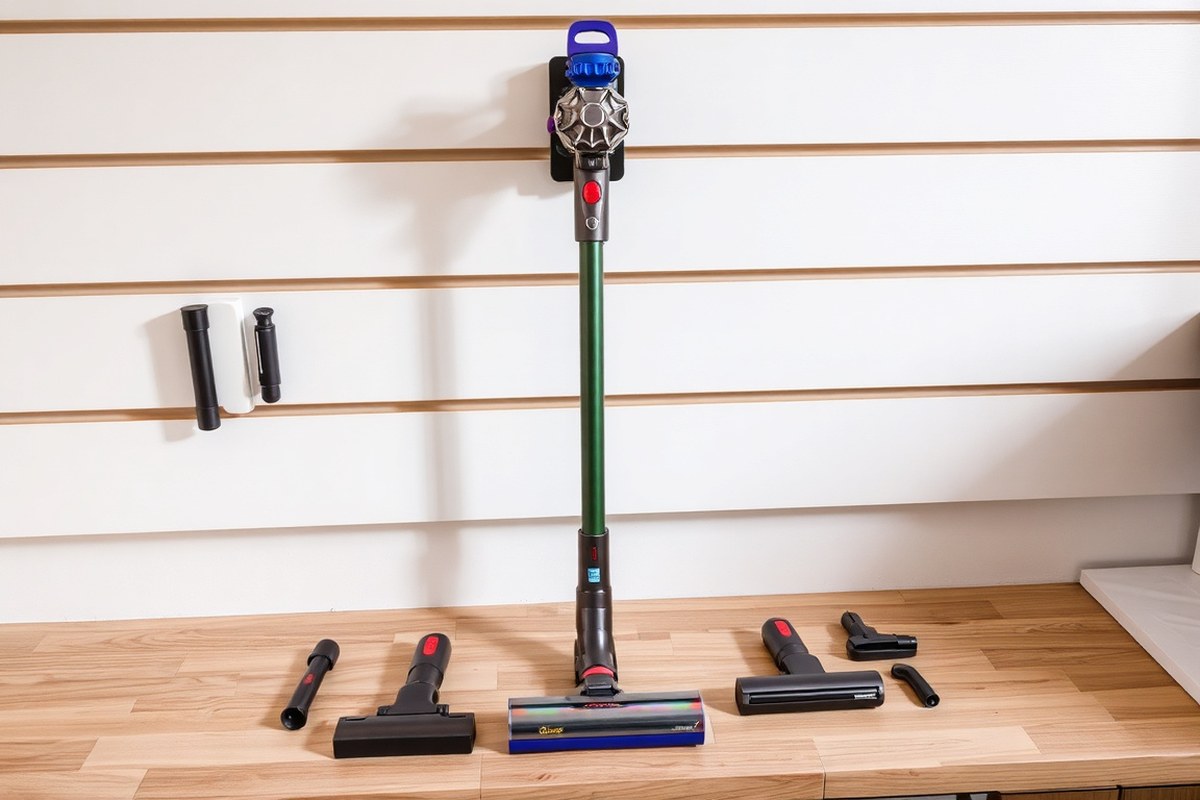
Magnetic nozzles are a handy feature on Dyson cordless vacuums. They snap on and off easily, letting you switch tools fast without fumbling.
Press the red button on the wand’s end to release the brush bar or other accessories. This quick swap lets you clean different surfaces effectively and saves time.
The brush bar design is key for removing hair and dirt. Dyson uses special bar shapes with stiff and soft bristles to tackle floors and carpets.
The brush spins to stir up dirt and pull it into the vacuum quickly. Smaller motorized heads work well in tight spaces or on furniture and stairs.
To get the most battery life, use the lowest power mode that still cleans well. Store your vacuum in a cool, dry spot to protect the battery. Clean the brush bar and nozzles regularly.
Check for hair wrapped around parts and remove it. Also clear out dust to avoid clogging. This lets your vacuum run smoothly and saves energy.
Don’t force a brush bar just because it’s stuck. Use the red button to safely remove it first.
Assembling and Preparing Your Dyson Vacuum for First Use
Before you start cleaning, your Dyson vacuum needs to be put together properly. Attaching the wand and the right cleaner head is key to getting the best results. Also, charging the battery fully ensures the vacuum runs long enough for your whole job.
Pick the cleaning head based on your floors. A fluffy cleaner head works well on hard floors. For carpets, the motorized cleaner head is better.
The wand connects these parts to the main body. Press them in firmly until you hear a click, so they are secure.
Check the vacuum for any loose parts or dust before first use. Make sure the dust bin is empty and locked in place.
Also, inspect the filter; it should be clean and properly seated. These steps help your vacuum perform at its best right away.
Charging your Dyson before the first use is important. The docking station usually comes with the vacuum. Plug it into a wall outlet and place the vacuum on the charger.
The light indicator will show when it is fully charged, usually after around 3.5 to 4 hours. Starting with a full charge means uninterrupted cleaning.
- Choose your cleaning head (fluffy for hard floors, motorized for carpets).
- Attach the cleaning head to the wand by pushing it until it clicks securely.
- Connect the wand to the vacuum body, again pressing until you hear a click.
- Empty the dust bin if needed and check the filter is clean and seated correctly.
- Locate the charging dock and plug it into a power outlet.
- Place your Dyson vacuum on the dock firmly and check that the charging light turns on.
- Wait until the charging indicator shows full battery before using the vacuum.
Not following these steps can cause poor suction or parts falling off during use. A vacuum that is charged and assembled right will clean efficiently and last longer. Avoid rushing the set-up to get the best performance every time.
Choosing and Using Dyson Attachments for Every Surface
Dyson vacuums come with several attachments for different cleaning jobs. These tools help you clean carpets, hard floors, upholstery, and tight spots. Swapping attachments is quick and safe once you know the simple steps.
Common Dyson Attachments and Their Functions
You’ll find several common Dyson tools designed for various surfaces and messes. The crevice tool cleans tight gaps and corners.
The flat floor tool works best on hardwood or tiled floors. The mini motorized brush tackles pet hair and upholstery effectively.
Some brushes, like the soft dusting brush, gently clean delicate surfaces. A combination tool lets you switch easily between soft and hard surfaces without changing tools. Below is a table comparing these attachments by what they do and where they work best.
| Attachment | Best For | Description |
|---|---|---|
| Crevice Tool | Tight spaces, edges, car seats | Small angled opening for narrow gaps and corners. |
| Flat Floor Tool | Hard floors, tiles, polished surfaces | Flattens against floor to pick up dust and debris. |
| Mini Motorized Brush | Upholstery, pet hair, carpets, rugs | Powered brush scrubs to remove stuck debris and hair. |
| Soft Dusting Brush | Delicate surfaces, lampshades, blinds | Soft bristles remove dust without scratching surfaces. |
| Combination Tool | Hard and soft surfaces | Two-in-one tool for switching between dusting and crevice. |
Using the right tool makes cleaning easier and protects your surfaces. The mini motor head, for example, is great for scrubbing dirt into carpets and rugs. Soft brushes avoid damage on delicate items.
How to Attach and Detach Tools Safely
Most Dyson attachments lock easily into place on the vacuum wand or main body. To attach, just align the tool with the opening and push until you hear a click. This confirms the tool is secure and ready to use.
To remove an attachment, hold the release button or lever near the connection point. Press or squeeze this and gently pull the attachment off. Doing this prevents damage to the tool or vacuum.
Always switch tools while the vacuum is off. This prevents accidental starts and lets you handle tools safely. Most attachments swap in seconds, so changing them during cleaning is fast and smooth.
Specialist Tools for Hard-to-Reach Areas
Dyson includes several tools designed for tricky spots. The crevice tool fits in narrow gaps like between couch cushions or under car seats. Point it directly at dirt for best pickup.
The mini motorized brush cleans upholstery or pet beds where dirt and hair get stuck. Its small size helps reach scruffy surfaces. You can use the hair screw tool on all surfaces.
It works well on wood floors and thick carpet. It especially helps catch clumps of hair.
A multi-angle brush helps dust high or awkward spots. Its adjustable head lets you clean corners and furniture ledges more easily than a flat brush.
Selecting the Right Cleaning Mode and Technique for Best Results
Use low power mode for everyday cleaning and light dirt. It saves battery and lasts longer. Switch to medium mode for carpets or floors with visible dust and pet hair.
High or boost modes work best on thick carpets and stubborn dirt spots. The stronger suction cleans more deeply but shortens your battery time. Save boost mode for quick, tough areas.
For hard floors like wood or tile, pick the articulating or flat floor tool. This tool adjusts easily for flat surfaces and avoids scratches. Move the vacuum slowly to pick up fine dust and debris well.
Soft, delicate surfaces such as fluffy sofas and pillows need a gentle touch. Use a dusting brush or mattress tool and press lightly. Drag the tool steadily to lift embedded dust without damaging fabric.
Vacuum in straight lines with overlapping passes. This avoids missing patches and improves dirt pickup. Twisting the brush head lets you clean corners and high spots comfortably.
Avoid rushing or using boost mode on all floors; it wastes battery. Also, don’t press too hard on soft surfaces which can push dirt deeper. Regularly check for clogs, especially in filters, to keep suction strong.
Clean the filter often to prevent blockages that reduce suction and cause stops.
How to Charge, Monitor, and Maximize Battery Life
Plug your Dyson vacuum’s charger into a wall outlet. Then connect it to the vacuum’s charging port.
Most models have a LED indicator that lights up to show charging status. It usually takes about 3.5 to 5 hours to reach a full charge, depending on your model.
Keep the vacuum connected until the indicator shows a full charge. This usually means the light turns green or goes off. Avoid unplugging early, as partial charges reduce your runtime.
Leaving it plugged in overnight now and then is fine. Don’t leave the vacuum charging all the time.
Store the vacuum and charger in a dry and cool place. Aim for between 50°F and 86°F (10°C to 30°C). Extreme heat or cold can reduce battery life.
Mount the charging station on the wall near where you clean. This helps keep the vacuum ready for use.
Avoid fully draining the battery too often, as this can shorten its lifespan. Instead, top up with shorter charges if needed.
Clean your vacuum’s filters and brush bars regularly. This reduces motor strain and helps the battery last longer.
Notice shorter run times or charging issues? The battery might be wearing out.
In this case, contact Dyson support or consider replacing the battery. Proper battery care will help keep your Dyson cordless vacuum working reliably for years.
Maintaining Your Dyson Vacuum for Long-Term Performance
To keep your Dyson vacuum working well, clean the dust container often. Wash the filter every month. Check the brush heads regularly for dirt and hair.
These steps stop clogs and maintain suction. A little time now saves you from costly repairs later.
Cleaning the Dust Container
The dust container fills up quick and blocks airflow when full. Empty it after every few uses or sooner if you vacuum lots of debris. Keeping it clear helps your vacuum keep sucking powerfully.
To clean it properly, follow these steps:
- Detach the dust container from the vacuum body by pressing the release button.
- Hold the container over a trash can to avoid spills.
- Press the bottom release to drop out the dirt and dust.
- Wipe the inside with a dry cloth if dust dust sticks.
- Reattach the container securely before the next use.
Doing this regularly keeps blockages from building up inside. Clean pet hair or dusty carpets more often. Check your vacuum parts more often too.
Washing and Drying the Filter
Dirty filters choke airflow and weaken suction. Washing them monthly keeps your Dyson working like new. More frequent cleaning may be needed if you vacuum multiple times a week.
Here’s a simple way to handle filter care:
- Remove the filter from the vacuum after unplugging it.
- Rinse the filter under cold running water. Avoid detergent or heat.
- Gently squeeze excess water without twisting or wringing.
- Leave the filter to air dry completely for at least 24 hours.
- Once dry, put the filter back in the vacuum.
Wait for your vacuum to cool down 30 minutes before cleaning the filter. Never use it with a wet or damp filter, or you risk damage.
Inspecting and Maintaining Brush Heads
The brush bar sweeps floors clean but often traps hair or string. This slows spinning and reduces cleaning power. Monthly checks catch problems early.
Look for tangled debris wrapped around the roller. Cut it away with scissors carefully to avoid cutting brushes. Wipe off dust with a cloth.
Also, check for loose parts and test the brush bar spins smoothly. Remove the brush head when it won’t spin or resists.
Clean the bearings inside to fix it. Maintaining these moving parts keeps your vacuum gliding easily on all floors.
Proper Storage and Handling of Your Dyson Vacuum Cleaner
Store your Dyson vacuum in a dry place to avoid moisture damage. Use the wall docking station if it came with one. Mount it on a convenient wall spot near a power outlet using the screws provided.
The docking station helps keep your vacuum charged and ready. After use, place the vacuum securely on the dock to avoid falls or knocks. This also keeps it neat and easy to grab for your next cleaning.
During transport, handle your Dyson carefully to avoid damage. Hold it by the main handle, not the wand or attachments. Avoid dropping or banging it against walls or furniture to protect internal parts.
When moving the vacuum between rooms, carry it instead of dragging it along the floor. This prevents wear on the wheels and lowers the risk of breaking attachments. Remove any heavy or bulky attachments first for easier handling.
Always use the wall dock to store and charge your Dyson. It prevents damage and keeps your vacuum charged without guesswork.
Troubleshooting Common Dyson Vacuum Issues and When to Get Help
Loss of suction, strange noises, and brush jams happen a lot. You can usually fix these Dyson vacuum problems by yourself. They don’t need a technician every time.
Simple checks like clearing blockages or cleaning the brush bar usually solve the problem. Knowing when to get professional help avoids worsening damage and unnecessary costs.
Common Issues and Easy Fixes
Start by checking the hose, wand, and brush bar for blockages. Dirt and clogs block the airflow, making the vacuum weaker. Strange sounds like grinding often mean debris or stuck parts.
Brush bars sometimes stop spinning because hair and fibers wrap around them tightly. Turn off the vacuum before you remove the brush bar. Take out tangles to help the vacuum work better.
This quick step often fixes the problem. Another simple fix: make sure the vacuum is fully charged and that filters are clean.
Clearing Blockages and Brush Maintenance
Turn the vacuum off before you clean it. Remove the brush bar and cut away any hair or strings tangled around it using scissors. This helps the brush spin freely and cleans carpets and upholstery better.
Check the hose and wand for blockages. Detach these parts, then look inside or blow compressed air through to clear clogs. Small clumps of dirt and pet hair often build up and restrict airflow.
- Remove the brush bar carefully on your model
- Use a pair of scissors to cut through tangled hair
- Check the hose and wand for any clogs or debris
- Clean or replace vacuum filters every few months
- Wipe down seals and edges to keep parts tight
The brush bar removal can vary slightly by Dyson model, so check your manual. Routine cleaning every one to two weeks prevents build-up. Proper maintenance keeps suction strong and the brush powering your cleaning.
Knowing When to Seek Professional Help
Call Dyson support or a repair pro if parts inside look damaged. Also, do this if the vacuum won’t power on.
Don’t try to fix these serious issues yourself. Also call for help if you keep losing suction after cleaning blockages and filters.
Strange electrical smells or sparks are signs to stop using the vacuum immediately. Repairs like motor replacement or electrical fixes should only be done by experts. Dyson’s customer support can offer guidance, warranty service, and advice through the MyDyson app or videos.
Repair fees vary a lot. Simple fixes can cost about $50. Motor repairs may go beyond $150.
Getting the right help early can save you from more expensive damage later. When your vacuum’s warranty ends, compare repair and replacement costs. This helps you decide which choice saves more money.
Step-by-Step Action Plan for Using Your Dyson Vacuum
Follow this plan to get the most from your Dyson vacuum right away. Each step helps you build good habits for cleaning and care.
- Day 1: Assemble your vacuum and charge it fully. Check the battery icon shows 100% before use.
- Day 2: Test the vacuum on different surfaces using the suitable attachment. Notice strong suction and smooth operation on each.
- Week 1: Learn the cleaning modes. Use Eco mode for light cleaning and Boost mode for deep dirt. Confirm by feeling suction power changes.
- Week 2: Empty the bin after each use and clean the filter when the vacuum signals. Make sure dirt collects in the bin, not in the filter area.
- Week 3: Check for blockages or tangled hair. Remove any to maintain suction. You’ll see easier airflow and better cleaning.
- Month 1: Store the vacuum in its dock or a cool, dry spot. Check the vacuum charges properly overnight.
- Ongoing: Replace filters as recommended or when suction decreases despite cleaning. Keep attachments tidy and ready.
Frequently Asked Questions
How Do I Use the Low Reach Adaptor on My Dyson Vacuum?
The low reach adaptor bends between 0° to 90°, letting you clean under low furniture. Slide it onto the wand to extend the brush head bar’s reach for those tough spots.
Can I Use the Mattress Tool for Upholstery Cleaning?
Yes, the mattress tool is perfect for beds and upholstery. It has a 45° angled plastic triangle that helps clean fabric surfaces effectively.
How Long Can My Dyson Cordless Vacuum Run on One Charge?
Dyson cordless vacuums run between 20 to 60 minutes per charge. Higher-end models usually last longer, so check your model’s specs for exact runtime.
Are Dyson’s Magnetic Nozzles Easy to Swap During Cleaning?
Yes, magnetic nozzles snap on and off within seconds and rotate 360 degrees. This makes switching attachments quick and easy while vacuuming.
What Is the Best Way to Keep My Dyson Vacuum Running at Full Power?
Emptying the bin regularly is the key habit to maintain suction power. Keeping filters clean also helps your vacuum run efficiently.
Can I Use Dyson Attachments on All Dyson Vacuum Models?
Most Dyson attachments fit every Dyson vacuum and tool, including hoses. This lets you clean different surfaces and hard-to-reach spaces with one vacuum.
Final Thoughts
Your Dyson vacuum works best with simple care and the right habits. Start by charging it fully and testing all cleaning modes. Take the first step today to keep your home clean with ease.